Align a signal to its peak
Question
Where is the peak after aligning each cycle?
See every package-generated example · Read the complete analysis pipeline
When to use
Use this to place a recurring signal peak at a common origin for shape comparison.
Example figure
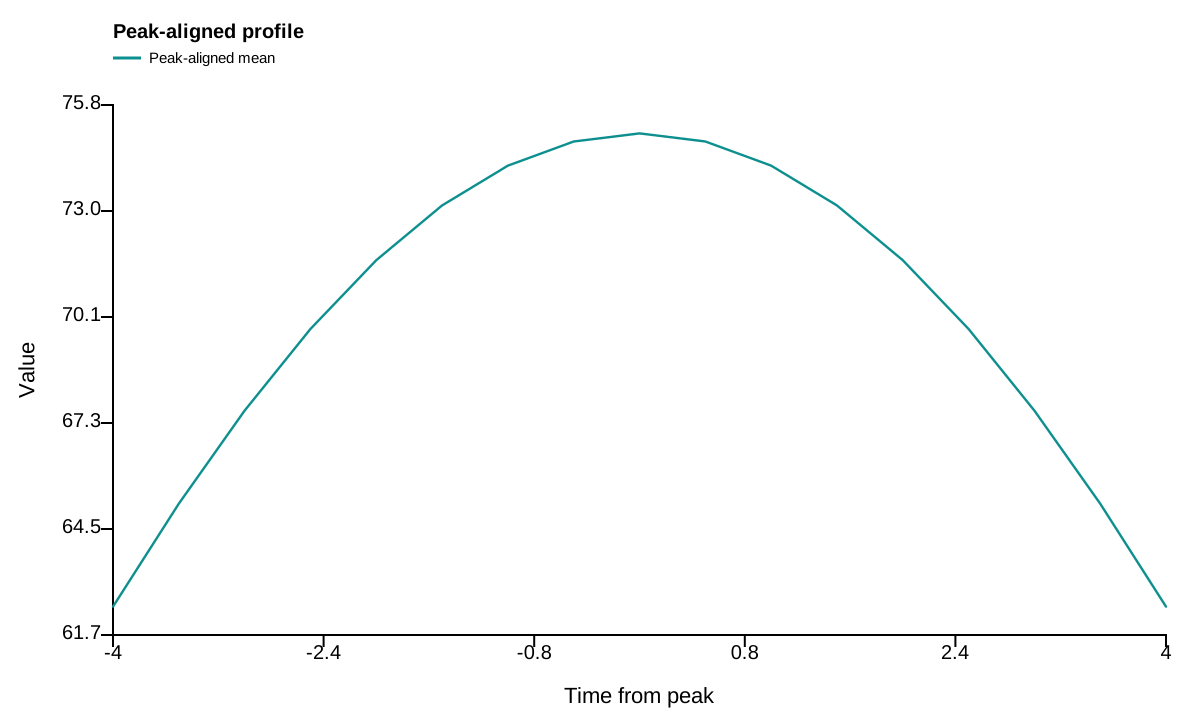
This deterministic example is calculated by the peak_aligned_profile action and drawn by render_peak_aligned_profile_svg, the same renderer used for publication export. Empty or withheld elements are therefore visible exactly as they are in a real result.
import circadian_workbench as cw

cw.call("peak_aligned_profile", recording={"path": "mouse01.awd"}, peak_period="morning")
Required inputs and controls
The public function is the registered action below. settings= is accepted as a friendlier alias for config= by cw.call; the calculation stores the complete normalized config in provenance.
Function reference
cw.call("peak_aligned_profile", recording, config=None, peak_period, anchor_amplitude=None, peak_options=None)
Arguments and parameters
| Name | Type | Required | Default | Units | Meaning |
|---|---|---|---|---|---|
recording |
recording spec | yes | — | - | The record to analyse: {'path': 'data/m01.awd'} (a bare path string also works), {'demo': true} for the built-in deterministic record, {'inline': {'filename': ..., 'text': ...}} for tabular text, {'trace': {'hours': [...], 'values': [...], 'name': ...}} for one elapsed-time trace, or {'channels': {'hours': [...], 'values': {'reporter_a': [...], 'reporter_b': [...]}}} for several measurements from one subject. A returned processed_trace spec retains transformed values, their original clock, source identity and explicit processing history. Versioned recording_snapshot specs are self-contained numeric inputs for replaying in-memory Recording objects; they do not invoke a raw-activity importer. |
config |
object | no | null |
- | Partial scientific settings. Omitted or None values use the shared installed defaults; invalid fresh values are rejected. Run describe_config for names, meanings, units, bounds and choices. Explicitly load old saved mappings with load_saved_settings to report compatibility conversions. |
peak_period |
string | yes | — | - | Peak to detect and align: morning (07:00-14:00) or evening (17:00-22:00). |
anchor_amplitude |
float | no | null |
activity amplitude | Optional established participant peak amplitude. When supplied, the unsmoothed aligned profile is scaled so time zero equals this value. |
peak_options |
object | no | null |
- | Peak-alignment options: alignment_window_hours, smoothing_window_bins, polynomial_order, minimum_peak_distance_hours, active_window_hours, and allow_window_max_fallback. |
Every nested config key, default, allowed value, and purpose is listed in the complete configuration reference.
How it works
A peak is detected in the chosen clock-time window and the profile is shifted around that peak.
$$ t_{\mathrm{relative}}=t-t_{\mathrm{peak}} $$
Implementation: analysis.py::peak_aligned_profile.
Outputs and interpretation
The result includes relative time, aligned values, detected peak and alignment settings.
cw.call returns a Result: use .data for calculated values, .warnings for scientific qualifications, .provenance for version and input identity, .script for an equivalent replay script, and .files for saved outputs.
Limitations
The window and peak choice control which feature is aligned; inspect the candidates for ambiguous peaks.
Example
The figure above is a real package result from a seeded, redistributable synthetic dataset. The flat gallery bundle retains figure_data_peak-aligned-profile.csv, a standalone plot_peak-aligned-profile.py, source hashes, an editable SVG, and a rendered preview.
Methods text
The profile was aligned to the detected peak within the declared peak window.
See also
Compare measurement channels · Measure population synchrony · Map phase across space · Analysis index · Gallery